
Setting up a dedicated home theater isn’t just about the screen and sound system, your seating determines whether you’ll actually want to spend hours in that space. Elite home theater seating separates a basement with a TV from a genuine cinematic experience. These aren’t recliners pulled from the living room. They’re purpose-built seats engineered for long viewing sessions, designed with premium materials, power features, and configurations that rival commercial theaters. Whether someone’s building a new media room or upgrading an existing setup, understanding what defines elite seating helps avoid expensive mistakes and ensures every movie night feels like an event.
Table of Contents
ToggleKey Takeaways
- Elite home theater seating uses hardwood frames, dual-motor power recline systems, and premium cushioning with pocketed coil springs to deliver comfort that budget models cannot match over long viewing sessions.
- Top features to prioritize include adjustable power headrests, dual USB charging ports (minimum 5V/2.4A), integrated LED cup holders, and smooth recline speed of 20-30 seconds from upright to full extension.
- Top-grain leather offers the best durability and luxury feel but requires conditioning every 6-12 months, while performance fabrics like Crypton provide stain resistance and superior breathability at lower maintenance.
- Proper room measurement is critical: power recliners need 38-42 inches of clearance when fully extended, multi-row setups require 48-60 inches between rows, and each elite seat measures 22-28 inches wide.
- Elite seating draws 3-5 amps per seat, requiring a dedicated 15-amp circuit for three to four seats; secure rows with L-brackets to floor joists and level all seats to prevent mechanism wear.
- Position the first row 156-260 inches from the screen (based on 1.5x to 2.5x screen width rule) and allow 20-30 hours of break-in time for cushioning and springs to fully conform before heavy use.
What Makes Home Theater Seating ‘Elite’?
Elite status isn’t about price tags alone. It’s defined by build quality, material grade, and feature integration that budget models can’t match.
Frame construction matters first. Elite seating uses hardwood frames (often kiln-dried maple or birch) with reinforced joinery, not particleboard or softwood that sags after a few years. Look for frames rated to support 300+ pounds per seat, critical for power mechanisms and longevity.
The reclining mechanism separates tiers quickly. Budget seats use cable-pull or manual recline. Elite models feature dual-motor power recline systems with independent backrest and footrest control, often with infinite positioning rather than preset stops. These systems run quieter (under 50 decibels) and include battery backup so users aren’t stuck reclined during power outages.
Cushioning architecture goes beyond foam density. Premium seats layer high-resilience polyurethane foam (1.8+ lb/ft³ density) over pocketed coil spring systems in the seat base, the same tech found in luxury mattresses. This prevents the “sitting in a bowl” feeling cheap foam develops after 12-18 months. Headrests and lumbar zones often use memory foam for personalized support.
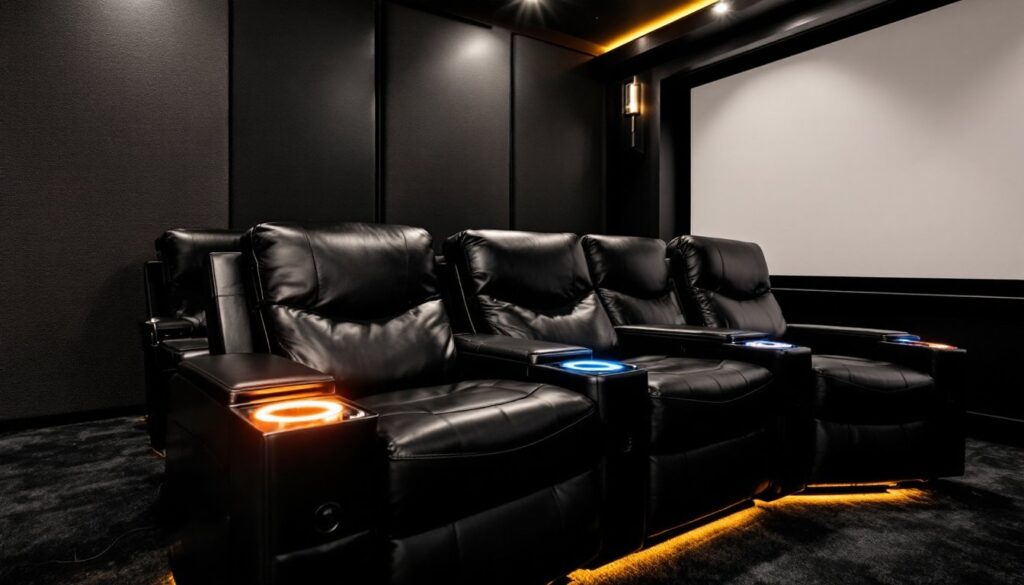
Elite seating also includes structural theater features: cup holders machined from solid materials rather than plastic inserts, storage consoles with felt-lined compartments, and LED ambient lighting integrated into bases or cup holders with adjustable color temperatures. These aren’t add-ons: they’re embedded in the design from engineering to upholstery.
Top Features to Look for in Premium Theater Seating
Certain features define the premium experience. Prioritize these when evaluating models.
Power Recline and Adjustable Headrests
Dual-motor power recline should be standard, not optional. Single-motor systems move the back and footrest in tandem, which works for some but limits customization. Dual motors allow someone to raise their feet without fully reclining, ideal for sports or gaming sessions.
Adjustable power headrests add measurable comfort for viewers of different heights. Manual headrests slip over time or require awkward repositioning. Power headrests (often a third motor) tilt forward or back via control buttons, keeping necks neutral whether someone’s 5’4″ or 6’2″. This feature appears in models typically above the $1,500-per-seat threshold but makes a noticeable difference during three-hour movie marathons.
Look for controls built into armrest panels, capacitive touch or backlit buttons beat fumbling for a remote. Some manufacturers include preset memory positions that recall preferred angles per user, stored in the seat’s onboard system. When evaluating premium home theater seating, test the recline speed: 20-30 seconds from upright to full recline feels smooth without being so slow it’s annoying.
Built-In Technology and USB Charging
USB charging ports (USB-A and increasingly USB-C) integrated into armrests or consoles are now baseline in elite seating. Verify they provide 5V/2.4A minimum output, anything less charges phones painfully slowly. Dual USB ports per seat work better for couples or families where everyone’s device needs a top-up during a double feature.
Some models add wireless charging pads built into armrest tops, though these require Qi-compatible devices and proper phone placement. They’re convenient but not essential.
Integrated speakers and transducers appear in ultra-premium lines. Seats with built-in bass shakers sync to the room’s audio system, adding tactile feedback for explosions or engine rumbles. This requires compatible AV receivers and adds complexity to setup, so it’s not for everyone. Lighted cup holders with adjustable LEDs prevent drink spills in the dark and add ambiance without washing out the screen. Verify they’re dimmable or can be turned off, blue LEDs reflecting off a screen ruin contrast.
Cooling and heating elements embedded in seat cushions and backrests represent the top end of tech integration. These climate-controlled seats use thermoelectric modules and require dedicated electrical circuits (typically 15A per row). They’re overkill for most setups but appreciated in climates with extreme temperatures or for users with medical conditions affected by heat.
Best Materials and Upholstery for Durability and Comfort
Upholstery choice impacts both longevity and maintenance. Elite seating typically offers top-grain leather, bonded leather, or performance fabrics, each with trade-offs.
Top-grain leather (not full-grain, which is rare in theater seats) offers the best combination of durability, breathability, and luxury feel. It resists stains better than fabric when treated with protectant and develops a natural patina over years. Expect to pay $200-400 more per seat for genuine top-grain versus bonded alternatives. Leather requires occasional conditioning (every 6-12 months) to prevent cracking, especially in low-humidity environments. It also feels cold initially and can be slick, consider texture preferences before committing.
Bonded leather (leather scraps bonded to a fabric backing) costs less and looks similar when new but peels and cracks within 3-5 years under regular use. It’s common in mid-tier seating marketed as “leather” without qualification. Ask specifically for top-grain or skip leather entirely rather than settle for bonded.
Performance fabrics (often polyester blends or microfiber) resist stains, moisture, and fading better than natural textiles. Brands like Crypton or Sunbrella engineer fabrics for commercial durability, and many elite seat manufacturers offer them as upholstery options. Fabric breathes better than leather, stays cooler, and provides more grip, useful on reclined seats. Cleaning requires a fabric cleaner and occasional vacuuming: most resist water-based spills for 30+ minutes if blotted quickly.
Faux leather (polyurethane or PVC-based) splits the difference on cost and performance. Quality varies wildly, premium faux leathers mimic the feel of top-grain and resist cracking better than bonded leather, while cheap versions feel plasticky and degrade fast. Test samples in person or request swatches before ordering.
Dark colors (charcoal, espresso, black) hide wear and minor stains better than light tones. If the room has HVAC vents aimed at seating, UV protection matters less than in rooms with windows. For spaces with daylight exposure, UV-treated fabrics or leathers prevent fading. Industry reviews often highlight cinema-grade seating upholstery that withstands commercial-level usage.
How to Choose the Right Configuration for Your Space
Measuring the room correctly prevents costly returns or cramped seating.
Start with seated recline clearance: most power recliners need 38-42 inches from the seat back to the wall when fully extended. Measure this before shopping. Wall-hugger mechanisms reduce this to 6-10 inches but often sacrifice footrest length, not ideal for taller users.
Row spacing for multi-row setups requires 48-60 inches between rows for comfortable walkways and to avoid kicking the seat ahead. If the room’s under 16 feet deep, stick to a single row or use a curved sectional configuration instead of straight rows.
Count seats based on room width minus aisle space. Each elite seat measures 22-28 inches wide (arm-to-arm). For a 12-foot-wide room, that’s realistic space for three to four seats with aisle access, not five crammed in. Curved row configurations (3-5 seats following a gentle arc) maximize sightlines to the screen without requiring excessive room width.
Modular vs. fixed sectionals: Modular seats link together but can be reconfigured. Fixed sectionals (often curved) ship as one piece or large sections. Modular works better for rooms with narrow doorways (under 36 inches) or tight stairwells. Measure door width, hallway clearance, and stairwell turns before ordering fixed pieces, sectionals can’t be disassembled if they won’t fit.
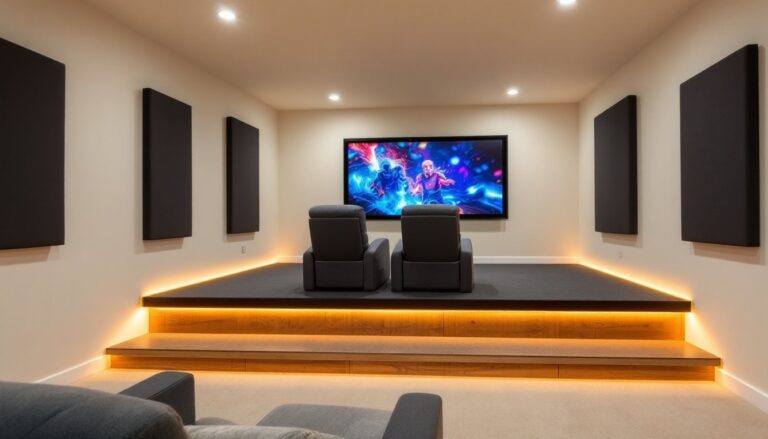
Risers and platforms improve sightlines in multi-row setups. A 12-inch riser for the back row works for most ceiling heights (9+ feet recommended for risers to avoid head clearance issues). Risers need structural support, if building one, use 2×6 joists on 16-inch centers minimum and anchor to wall studs. This is cosmetic carpentry, not structural work, so permits usually aren’t required, but verify local code if adding electrical for seat power.
Elite seating draws 3-5 amps per seat for motors, USB, and accessories. A dedicated 15-amp circuit handles three to four powered seats safely. For larger configurations, plan for multiple circuits or a 20-amp circuit. Consult an electrician if running new lines, poor wiring causes tripped breakers mid-movie.
Installation and Placement Tips for Maximum Comfort
Proper placement enhances comfort and protects the investment.
Screen distance follows the 1.5x to 2.5x screen width rule. For a 120-inch diagonal screen (104 inches wide for 16:9 aspect), position the first row 156-260 inches (13-21.5 feet) away. Closer causes eye strain: farther reduces immersion. Elite seats with adjustable headrests help dial in the ideal viewing angle, aim for eye level at the screen’s vertical center when seated upright.
Anchor seats to prevent walk: Rows of linked seats can creep forward on hardwood or tile over time as recline mechanisms shift weight. Use L-brackets screwed into floor joists (for wood subfloors) or concrete anchors (for slab foundations). If avoiding floor penetration, non-slip rug pads under each seat base reduce movement but won’t fully prevent it with heavy use. Some manufacturers include adjustable feet that lock the seat in place, verify this feature when ordering.
Leveling: Floors are rarely perfectly flat. Use a 4-foot level across the seat row: shim low spots with plastic furniture shims until all seats sit evenly. Unlevel seats cause recline mechanisms to bind or wear unevenly.
Cable management: Power cords, USB cables, and audio connections create trip hazards and visual clutter. Run cables through riser cavities if using platforms, or use cable raceways along baseboards. For slab floors without risers, some installers cut shallow chases in drywall behind seating and fish cables through, patching and painting after. This requires drywall skill but delivers the cleanest look. When comparing elite models, check whether power connectors are on the seat base or rear, rear connectors hide better but make unplugging harder.
Break-in period: Premium cushioning and leather feel stiff initially. Expect 20-30 hours of use before foam and springs fully conform. Avoid maxing out recline features constantly during break-in, cycle through positions to let mechanisms settle evenly.
Safety note: Power recline mechanisms have pinch points between moving parts. Keep kids and pets clear during operation, and use lockout features (if available) to prevent unsupervised use. Wear work gloves when assembling or moving seats, frames and hardware have sharp edges.